57 documented feature areas

ISP billing software features

Billing, subscribers, network operations and support — connected in one platform built for Internet Service Providers.

57Documented feature areas
24Payment providers
37SMS providers
84Directory integrations
ISPbills in action

Operations and customer service, in one platform

Real product screens for network teams, business operations and subscriber self-service.

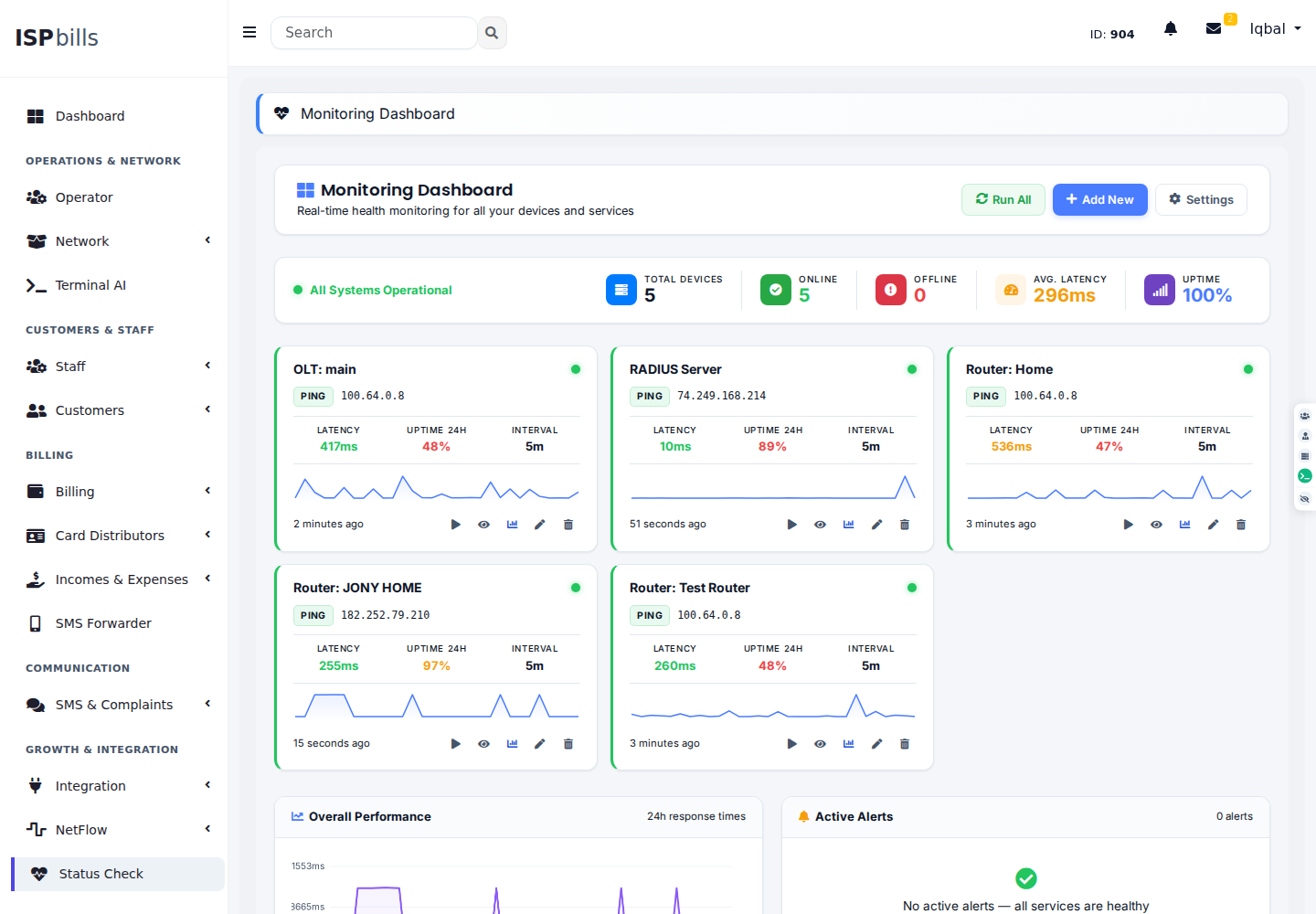
ISPbills status monitoring dashboard showing device health, latency and uptime
Network health

See every critical service at a glance

Track availability, latency and uptime from one clean operations dashboard.
Live status Latency history Instant alerts
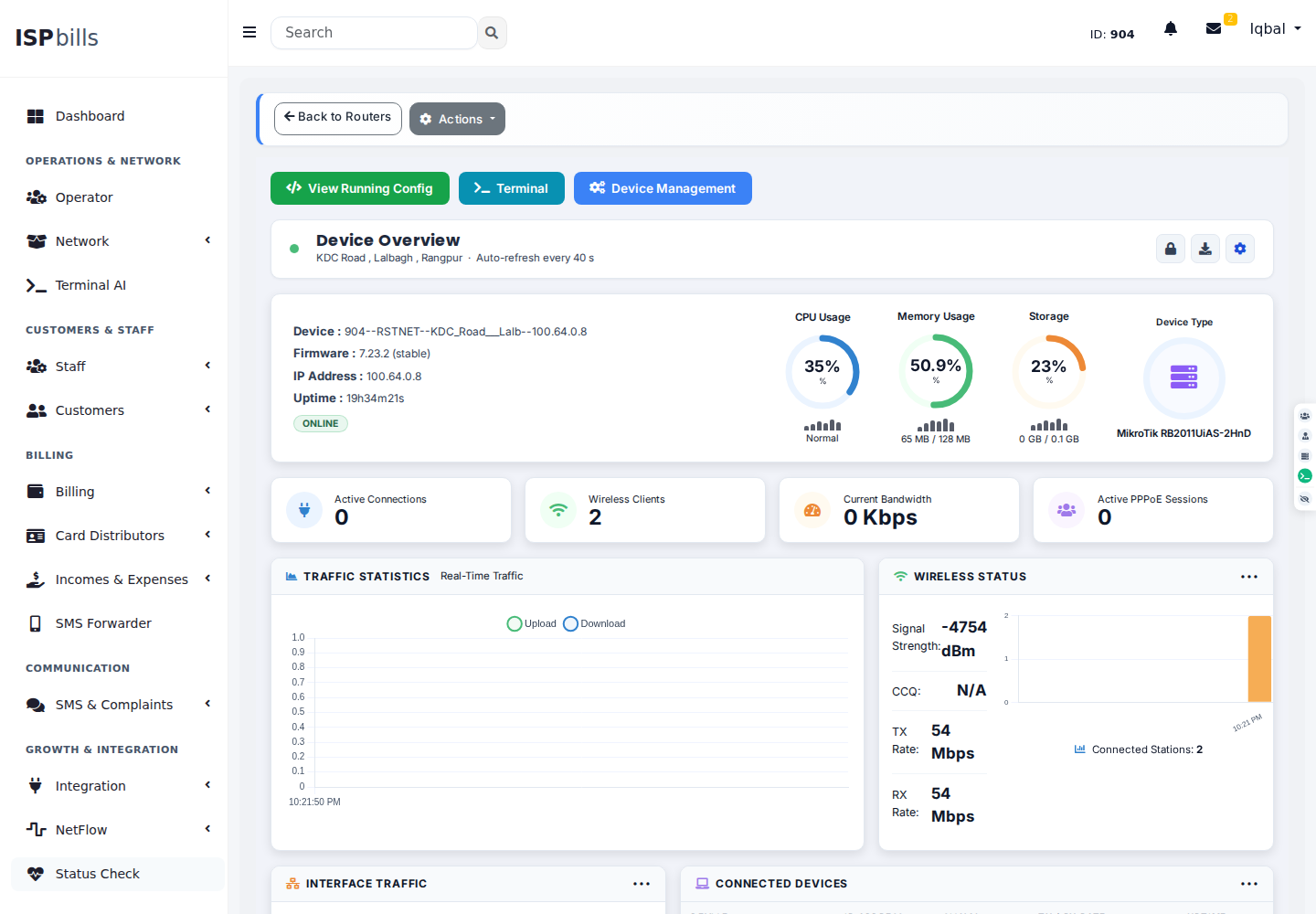
Live MikroTik RouterOS monitoring dashboard with CPU, memory, wireless and traffic data
MikroTik monitoring

Go from router health to traffic detail

Monitor RouterOS resources, wireless clients, interfaces and live bandwidth without leaving ISPbills.
Router resources Wireless status Interface traffic
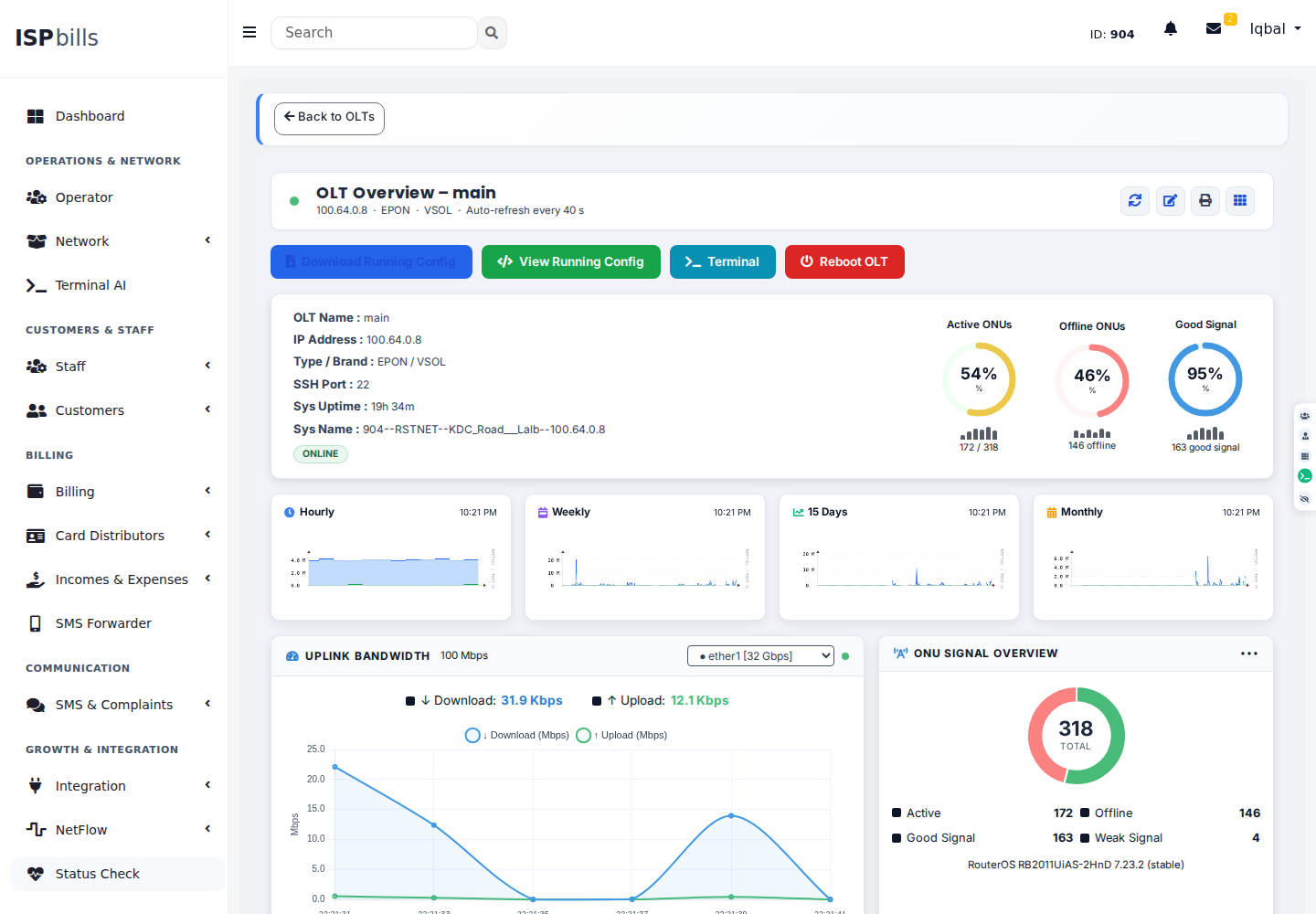
Live OLT dashboard showing ONU status, optical signal quality and bandwidth graphs
Fiber operations

Manage OLT and ONU health visually

View online ONUs, signal quality, uplink traffic and performance trends from a live OLT workspace.
ONU health Optical signals Uplink graphs
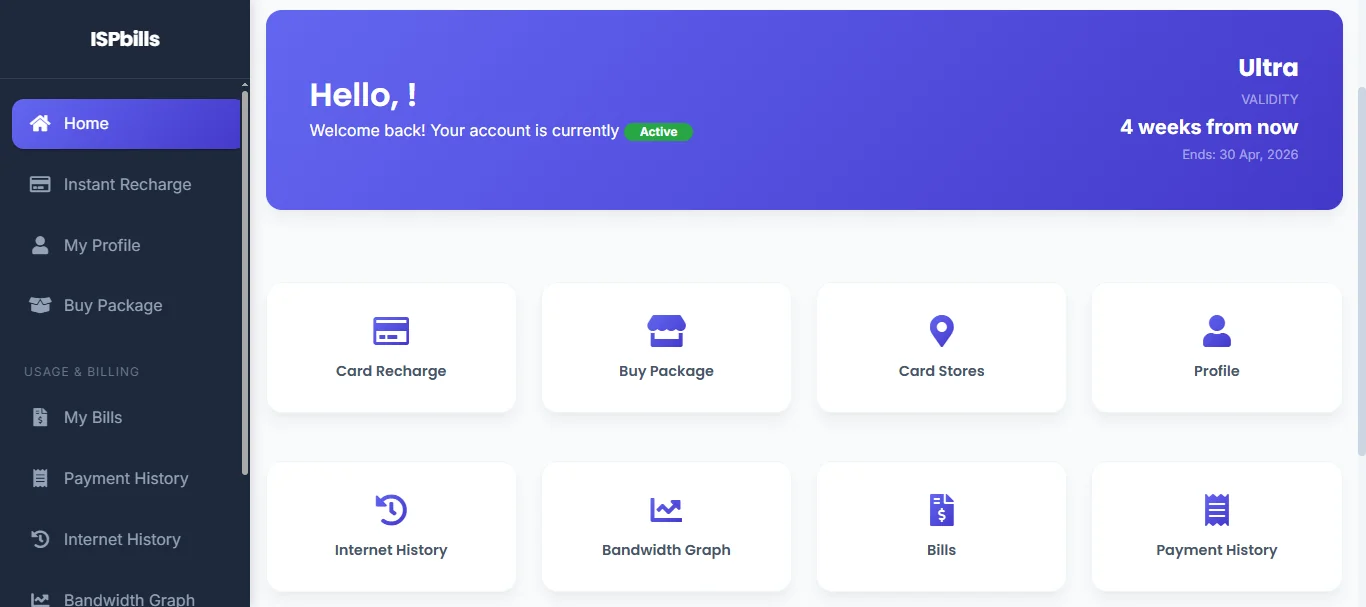
ISPbills Customer Portal showing subscriber self-service, account status and online payment access
Customer Portal

Give subscribers a direct self-service path

Offer a branded Portal where subscribers can review their service, pay bills online, download receipts and open support tickets from any device.

Online payments Self-service Support tickets
Explore Portal capabilities
Complete platform

Everything your ISP needs

Explore 57 documented feature areas in 8 workflow groups, from initial setup to everyday operations and product guidance. Each area groups related workflows; individual screens and actions are not counted as separate modules. Availability depends on your role, plan, configuration and supported hardware.

Feature guide

Getting started

Prepare your ISP workspace, business identity and existing subscriber records.

#01

Guided ISP Setup

Identify unfinished setup before running daily operations, with checks tailored to the ISP and reseller hierarchy.

  • Checks missing routers, subscriber records and pending imports
  • Checks package and billing-profile assignments for operators
  • Flags incomplete package pricing and authenticator backup settings
  • Business-profile completion checks for the ISP administrator
#02

Business Branding

Maintain your ISP identity and local operating preferences without confusing subscriber-facing branding with the separate partner storefront product.

  • Company name, native-language company name and logo upload
  • Business address, contact number and customer helpline
  • Country, language, timezone and billing-currency preferences
  • Biller VAT settings and eligible VAT-profile selection
#03

Bulk Subscriber Operations

Move existing customer records into ISPbills and maintain subscriber groups with guided imports and bulk updates.

  • Spreadsheet templates, field mapping and import previews
  • PPPoE customer import from supported MikroTik routers
  • Bulk customer edits and MAC-binding workflows
  • Package, billing-profile and IP-pool replacement workflows
Feature guide

Subscriber services

Organize customer records, verify registrations and define the services you sell.

#04

Subscriber Management

Manage the complete customer lifecycle from registration to suspension through a unified 360-degree subscriber profile.

  • Searchable subscriber profiles with connection and service details
  • Activation, suspension, deletion and deleted-account recovery
  • MAC binding, address assignment and per-customer service limits
  • Link customer accounts to a parent or separate them again
#05

Registration Verification

Choose supported registration-verification methods and review National ID submissions before granting access. This is an ISP review workflow, not a government identity-database lookup.

  • Configurable mobile OTP, National ID or manual-review registration policy
  • Consented ID submissions with encrypted numbers and duplicate checks
  • Protected review queue with recorded approval or rejection reasons
  • Portal access while internet activation awaits verification
#06

Internet Packages

Build the service catalog that connects subscriber pricing to network speed, volume and validity controls.

  • Master packages for supported PPPoE, Hotspot, static-IP and other services
  • Rate limits, data allowances and package validity settings
  • PPPoE profile association and operator package pricing
  • RouterOS or RADIUS speed controls, including supported simple queues
#07

Billing Profiles

Separate billing rules from speed packages so customer groups and resellers can use appropriate invoice and renewal policies.

  • Named profiles with minimum validity and billing due dates
  • Automatic invoice and account-lock policy switches
  • Operator assignments and per-profile customer counts
  • Replace profiles safely when customers still use them
#08

Fair Usage Policies

Apply package-level data caps and reduced-speed policies to PPPoE subscribers who exceed their allowance, separate from package pricing and bulk migrations.

  • Configurable data allowances for each package policy
  • Automatic reduced-speed activation after the data cap
  • Alternate IPv4 pool assignments for FUP subscribers
  • Policy updates and removal with subscriber reactivation
#09

ISP Service Policies

Control the available subscriber and reseller options from group-level settings rather than applying one fixed policy to every ISP.

  • Billing cutoffs, overdue suspension and inactive-account billing rules
  • Control customer profile editing, online recharge and reseller downgrades
  • Configure Hotspot MAC binding and eligible PPPoE-to-Hotspot access
  • Configure customer-portal links to your own FTP, live-TV and movie services
Feature guide

Business finance

Turn service plans into invoices, collect payments and reconcile your accounts.

#10

Automated Billing

Generate invoices automatically from subscriber packages, billing cycles and due dates with prepaid, postpaid, daily and monthly models.

  • Automatic invoices based on packages and billing cycles
  • Daily or monthly billing with prepaid and postpaid models
  • VAT calculation using configured tax profiles
  • Automatic bill settlement from eligible advance balances
#11

Online Payment Gateways

Collect subscriber payments through 24 distinct external providers. Merchant setup and regional availability determine which methods can be offered.

  • bKash, Nagad, Stripe, SSLCommerz, M-Pesa and other regional providers
  • Hosted checkout and individual payment links
  • Gateway payment history and pending-payment review
  • Configurable gateway service charges and payment breakdowns
#12

iPay Payment Forwarder

Review supported merchant-wallet payment messages forwarded from registered Android devices and reconcile them with subscriber payments.

  • Forwarder device registration and recent device activity
  • Incoming payment-event matching and duplicate detection
  • Eligible automatic approval with manual review and recheck options
  • Search by transaction reference, status and date range
#13

Customer Wallet

Use customer advance balances for supported self-service time purchases. Availability depends on ISP policy and a package with minute-based pricing.

  • Record advance balances under the configured staff-funding policy
  • Buy additional internet minutes from the existing package rate
  • Extend or restart validity with supported authorization updates
  • Configurable emergency-balance allowance for time purchases
#14

Cash Collections

Track offline collections and money handed over by staff alongside online payments, with separate receivable and settlement records.

  • Record attributed cash payments and eligible manager collections
  • Review payable and receivable balances in the accounting workflow
  • Record cash received from a collector with an amount and note
  • Pending cash-out transaction review and settlement history
#15

Prepaid Recharge Cards

Generate, distribute and reconcile scratch-card based prepaid recharges through a dedicated distributor portal.

  • Card batches with configurable denominations and printable downloads
  • Distributor portal for customer search, recharge and bill payment
  • Card payment history, reconciliation and distributor reports
  • Hotspot recharge and package changes through cards
#16

Financial Accounting

Manage accounts, journals, ledgers, expenses and financial reports alongside ISP billing and collections.

  • General ledger and journal entry management
  • Statements, balances and cash-in or cash-out recording
  • Daily and monthly accounting reports
  • Expense categories, subcategories and income-versus-expense analysis
Feature guide

Customer experience

Connect guests, support subscribers and keep customers and teams informed.

#17

Customer Self-Care Portal

Give subscribers a branded, mobile-ready portal for bill payment, connection status, support tickets and account management.

  • Subscriber bill payment with invoice and receipt downloads
  • Support ticket creation and tracking
  • Bandwidth usage, connection status and package details
  • Available package purchases and service self-care actions
#18

Hotspot Guest Access

Connect guests through a captive-portal journey that combines registration, mobile verification, package selection and device-bound access.

  • Guest self-registration and mobile OTP verification
  • Optional face-photo enrollment, package-first access and eligible trials
  • Verified device replacement without changing the primary PPPoE binding
  • Downloadable MikroTik captive-login template with mobile, voucher and supported Google sign-in paths
#19

Hotspot Advertising

Run Wi-Fi advertising campaigns before internet access, with guest targeting, controlled playback and measurable engagement.

  • Banners, interstitials, timed videos and external website creatives
  • Schedule campaigns by router, package, customer, device or language
  • Viewing rules, frequency caps and campaign Walled Garden setup
  • Impression, completion and click reports with voucher promotion
#20

Suspended Customer Portal

Give suspended subscribers a clear notice and payment path through an ISP-configured portal and supported MikroTik redirect rules.

  • Configure the suspension notice and ISP contact information
  • Enable or disable the redirect for individual routers
  • Present available payment methods on the notice page
  • Coordinate suspended-address lists with router policies
#21

Customer Support Tickets

End-to-end complaint management with categories, departments, priorities and SLA tracking, including customer self-service ticket creation.

  • Customer complaints with categories and department routing
  • Priority, SLA tracking and staff acknowledgment
  • Assigned staff, CC participants, comments and attachments
  • Complaint history and resolution-time reports
#22

Internal Team Tickets

Route staff and reseller issues through an internal ticket workflow, distinct from subscriber complaints and ISPbills platform-support conversations.

  • Staff-created tickets with topic, category, department and priority
  • Topic-based assignment with role-hierarchy fallback
  • Requester conversations with status and assigned-to-me filters
  • Assignment notifications and ticket activity records
#23

SMS Gateways

Connect to 37 registered SMS providers for subscriber messaging. Delivery requires an active provider account, valid credentials and an approved sender where required.

  • Provider-specific credential and sender-number configuration
  • Use an ISP-owned gateway or an eligible shared gateway in the hierarchy
  • Message history with recipient, message text and delivery-status records
  • Supported SMS cost accounting with reseller cost-payer rules
#24

Customer Notifications

Reach subscribers through SMS, email, WhatsApp, Telegram and in-app messaging with automatic event-driven triggers.

  • Event-triggered messages and automatic due-date reminders
  • WhatsApp broadcasts and Telegram emergency alerts
  • Payment-link broadcasts through SMS and email
  • Custom notification templates with event mapping
Feature guide

Network infrastructure

Configure subscriber access and operate supported routers, fiber, wireless and VPN services.

#25

RADIUS Authentication

Centralize authentication, authorization and accounting directly from the ISPbills administration panel.

  • NAS registration for subscriber authentication
  • Per-user and group RADIUS check/reply attributes
  • Accounting sessions and post-authentication records
  • PPPoE and Hotspot authorization with CoA support
#26

One-Click MikroTik Configuration

Select the operator and apply the ISPbills RouterOS setup with one Configure Router action. Requires a reachable router, write-capable API credentials and existing Hotspot servers where needed; this is not a zero-touch factory setup.

  • Automatically apply RADIUS, PPPoE AAA and supported Hotspot settings
  • Apply managed NAT, Walled Garden and subscriber-access policies
  • Optional system-identity update for the selected operator
  • iPilot-triggered setup with queued progress and per-step results
#27

AI Device Configuration

Ask iPilot to configure supported OLTs, managed switches and MikroTik routers in plain language. Live changes require explicit operator approval, device-management permission and compatible access. Fleet checks remain read-only; disruptive actions need a reviewed plan.

  • AI-assisted OLT configuration through supported device CLI commands
  • AI-assisted switch configuration over configured SSH or Telnet access
  • MikroTik configuration commands through the RouterOS API
  • Inspect device output and apply approved single-device command sequences
#28

IP Address Management

Organize subscriber address space with IP pools, subnet checks and PPPoE profile assignments rather than maintaining separate spreadsheets.

  • Create and maintain IPv4 subnets and IPv6 prefix pools
  • Overlap validation with IPv4 network, gateway and broadcast reservations
  • Assign pools to PPPoE profiles and edit subscriber addresses
  • Pool replacement and unused IPv4 pool cleanup
#29

OLT Management

Manage FTTH, GPON and EPON infrastructure across 11 named OLT profiles. Discovery, provisioning and telemetry depend on model, firmware and profile; not every profile is hardware-verified.

  • ONU discovery and synchronization with supported OLTs
  • PON port monitoring with optical RX and TX power levels
  • Map and unmap subscribers to their ONU
  • Inspect uplink traffic, interfaces and running configuration
#30

Managed Switches

Maintain managed-switch records and inspect health over configured SNMP access. Available readings depend on the device model and firmware; AI configuration is covered separately.

  • Switch records with brand, model, location and management protocol
  • SNMP system identity and uptime readings
  • Interface state, link speed and traffic counters where exposed
  • Device creation, update and access audit records
#31

Wireless Device Monitoring

Bring supported Ubiquiti and Cambium radios into the network workspace. Live readings require compatible device APIs and configured access.

  • Ubiquiti and Cambium radio records with supported health readings
  • Signal strength, noise and link-quality readings
  • Transmit and receive rates with traffic counters
  • Connected station or subscriber-module details
#32

VPN Management

Offer managed VPN services with server, address-pool, account and certificate provisioning from ISPbills.

  • SSTP, MikroTik, OpenVPN and WireGuard server workflows
  • VPN address pools, account provisioning and revocation
  • OpenVPN certificates with encrypted CA storage
  • Client configuration downloads and server connection checks
#33

RADIUS Equipment Login for Staff

Manage supported staff equipment logins centrally, separately from subscriber PPPoE and Hotspot authentication.

  • Register equipment as RADIUS administration clients
  • Grant or revoke staff read, write and full-access authorization
  • Vendor-specific attributes and setup guidance for supported devices
  • Recent equipment authentication and login-session records
#34

Subscriber Authentication Backups

Maintain supported subscriber copies on a selected MikroTik router and manage the primary authenticator. This is not a full database backup or a guarantee of automatic failover.

  • Per-operator backup-router and primary-authenticator settings
  • Automatic or manual backup mode selection
  • Copy subscriber credentials with supported profile and package dependencies
  • Queued backup requests and primary-authenticator change workflows
Feature guide

Network operations

Watch service health, investigate incidents and maintain the network map and configuration history.

#35

Network Monitoring

Full-featured Network Operations Center with real-time device monitoring, traffic graphs, instant alerts and integrated Zabbix support.

  • Device uptime checks with SMS, email and Telegram alerts
  • Live MikroTik resources, interfaces and connected sessions
  • Bandwidth history with RRD and PPPoE traffic graphs
  • Zabbix hosts, problems and monitoring dashboard integration
#36

DDoS Protection

Investigate attacks and coordinate scoped mitigation for protected networks. Requires an active plan or trial, configured telemetry and verified response connectors.

  • Protected prefixes, detection policies and attack evidence
  • Supported RTBH, FlowSpec, router-firewall and webhook connectors
  • Observe-only, approval-based and policy-controlled response modes
  • Essential-address protection, expiring actions and withdrawal workflows
#37

Equipment Inventory

Keep location-based equipment records and review routers, OLTs, ONUs and other field equipment through inventory reports.

  • Equipment records with names, locations and map coordinates
  • Combined router, OLT and ONU inventory lists
  • Operator-scoped equipment ownership and access
  • Inventory exports for field and office teams
#38

GIS Network Mapping

Plot subscribers, ONUs, routers, poles and cable routes on an interactive map with precise network and customer location data.

  • Subscriber and device locations with GPS-assisted placement
  • ONU fanout view for every connected subscriber
  • Fiber cable route drawing and pole mapping
  • Coverage visualization with reverse-geocoded addresses
#39

Network Topology

Trace logical device relationships to understand how subscribers connect through the access network. Geographic locations and cable routes are covered by GIS Network Mapping.

  • Router-to-OLT-to-ONU-to-subscriber relationship views
  • Custom network nodes and connections
  • Saved diagram positions for repeat investigations
  • Inferred optical relationships distinguished from confirmed mappings
#40

Device Configuration History

Keep versioned configuration snapshots for supported routers and OLTs so teams can inspect changes and prepare recovery.

  • On-demand backups with per-device Git history
  • Compare revisions with split configuration diffs
  • Download the latest or a selected historical configuration
  • MikroTik restore actions and OLT checkpoint handoff to iPilot
#41

Public Status Page

Publish selected service checks and incident information to a public status page without exposing the internal monitoring workspace.

  • Select active ping, HTTP, TCP and DNS checks for public display
  • Recent availability and average response-time summaries
  • Active incidents and resolved incident history
  • Public service announcements and maintenance notices
Feature guide

Business administration

Delegate responsibilities, review business performance and investigate operational activity.

#42

Business Dashboards

Role-focused dashboards combine administrative, NOC and business metrics with live widgets and exportable reports.

  • Revenue, collection and subscriber statistics
  • NOC network-health and device-status dashboard
  • Active, billed, paid and suspended customer widgets
  • Top bandwidth-consuming subscriber rankings
#43

Operational Reporting

Prepare operational and regulatory reporting data from customer, payment and network records. Review exports against your current local filing requirements.

  • BTRC-format subscriber CSV export for Bangladesh ISPs
  • Customer internet-session history downloads
  • Customer, payment, inventory and custom report families
  • Filtered report exports in supported CSV, Excel and PDF formats
#44

Reseller Panel

Give each ISP reseller a dedicated operator panel for subscriber business, assigned services and financial oversight. This panel is separate from the ISPbills platform-partner storefront.

  • Reseller login with a role-specific business dashboard
  • Assigned service packages, pricing and billing profiles
  • Income, expenses, collections and account-balance summaries
  • Create and manage downstream sub-reseller accounts
#45

Sub-Reseller Panel

Give downstream resellers their own sub-operator login under a parent reseller, with assigned billing profiles and an account-specific business dashboard.

  • Separate sub-reseller account, company profile and login
  • Billing profiles assigned from the parent reseller workflow
  • Account type, balance and credit-limit controls
  • Own income, expense, billing, collection and open-complaint summaries
#46

Staff Permissions

Delegate operations to managers, NOC, accounts and support staff using role-specific workspaces and configurable permissions.

  • Create and maintain staff accounts under the ISP hierarchy
  • Granular NOC, accounts and support permissions
  • Role-focused dashboards and permitted customer actions
  • Separate network operations from financial-report access
#47

Account Security

Offer supported password, authenticator, passkey and social sign-in journeys with separate staff and customer sessions.

  • Authenticator-app two-factor enrollment for supported staff roles
  • WebAuthn passkey registration and sign-in when enabled
  • Configured social-login provider connections
  • Account verification, password recovery and mobile-session controls
#48

Operational Audit Logs

Investigate access problems and operational changes through role-scoped authentication, device and activity histories.

  • RADIUS post-authentication records for subscriber troubleshooting
  • Device-access history filtered by device, action and outcome
  • Operator activity records for supported account and service changes
  • Paginated histories within the permitted administrative scope
Feature guide

Platform resources

Extend your workflows, work from Android, grow a partner business and find product guidance.

#49

iPilot AI Terminal

Give NOC engineers and administrators a plain-English workspace for subscriber queries, diagnostics and guided business actions. Device configuration is documented separately.

  • Subscriber lookup by name, phone, IP or username
  • Live ping, traceroute and network diagnostic queries
  • Authorized invoice generation and subscriber messaging
  • Web and CLI access with conversation history, artifacts and action logs
#50

Developer API

Build integrations through REST APIs, managed API clients and developer-ready reference material. Event delivery has its own Webhooks feature.

  • REST API v1 and v2 with core-resource CRUD
  • API client creation with key-based authentication
  • OpenAPI documentation and Postman collection
  • Public MCP endpoint for supported product tools
#51

Event Webhooks

Send supported application events to your own systems instead of relying only on repeated API polling.

  • Operator-owned destinations managed through the panel or API
  • Choose subscribed events and enable or pause each endpoint
  • Queued delivery with event, timestamp and data fields
  • HMAC-SHA256 signatures for receiver-side verification
#52

Android Applications

Use dedicated Android applications for administration, customer self-care and partner access. Screens and actions follow the signed-in account permissions.

  • iAdmin subscriber, billing, network and team workspaces
  • Customer app with authenticated self-care portal access
  • Partner app with its own commercial portal session
  • Push notifications through configured mobile messaging services
#53

Platform Partner Storefronts

Run a branded reseller-partner business for ISP clients, separate from the operator hierarchy that manages an ISP's own subscribers.

  • Branded storefront with signup and verified custom-domain setup
  • Client ISP provisioning, offers and retail invoices
  • Partner wallet funding, wholesale billing and accounting reports
  • Partner staff, payment gateways and SMS settings
#54

ISP Subscription Portal

Manage your own ISPbills subscription, invoices and optional services from a commercial portal distinct from subscriber billing.

  • Active-subscriber pricing and supported currency quotes
  • Plan selection, renewals and subscription invoice downloads
  • Available add-on purchase and entitlement tracking
  • iPilot credit balance and usage visibility
#55

Platform Referral Program

Refer other businesses to ISPbills and review attributed signups and commission records. Program eligibility and commission rules apply; this is not a subscriber loyalty scheme.

  • Personal referral code and shareable registration link
  • Attributed signup history in the commercial portal
  • Recent commission records with their current status
  • Earned totals based on credited or paid commissions
#56

Documentation

Find product guides from the public Help Center and in-app Help workspace, with direct paths from instructions to platform support.

  • Getting-started, billing and network-setup guides
  • API reference links for integration developers
  • In-app article search when the knowledge-base connection is configured
  • Help-workspace links to system status and platform support
Browse documentation
#57

ISPbills Support

Contact ISPbills from the platform support portal. The ISPbills support team uses an Intercom-connected inbox with configurable AI-assisted replies.

  • Own platform-support conversations with messages and attachments
  • Synchronized Intercom conversations and reply status
  • AI reply drafts for review or configured automatic delivery
  • Waiting-on-customer and closed states kept distinct
Integration ecosystem

Connect payments, messaging and network hardware

Explore 84 directory entries across payment and SMS providers, equipment profiles, communication channels and protocols.

Explore integrations →

Ready to transform your ISP business?

Bring billing, subscribers, network operations and support into one production-ready platform.