MikroTik control planeUpdated October 2026
MikroTik ISP Operations: RouterOS, PPPoE & RADIUS
Connect RouterOS subscriber access, PPPoE, Hotspot, queues, address pools and live device context to the same billing and support record. ISPbills supports both RouterOS API workflows and centralized RADIUS architectures.
- RouterOS 6 and 7 workflows
- API and FreeRADIUS operating models
- No per-router device fee
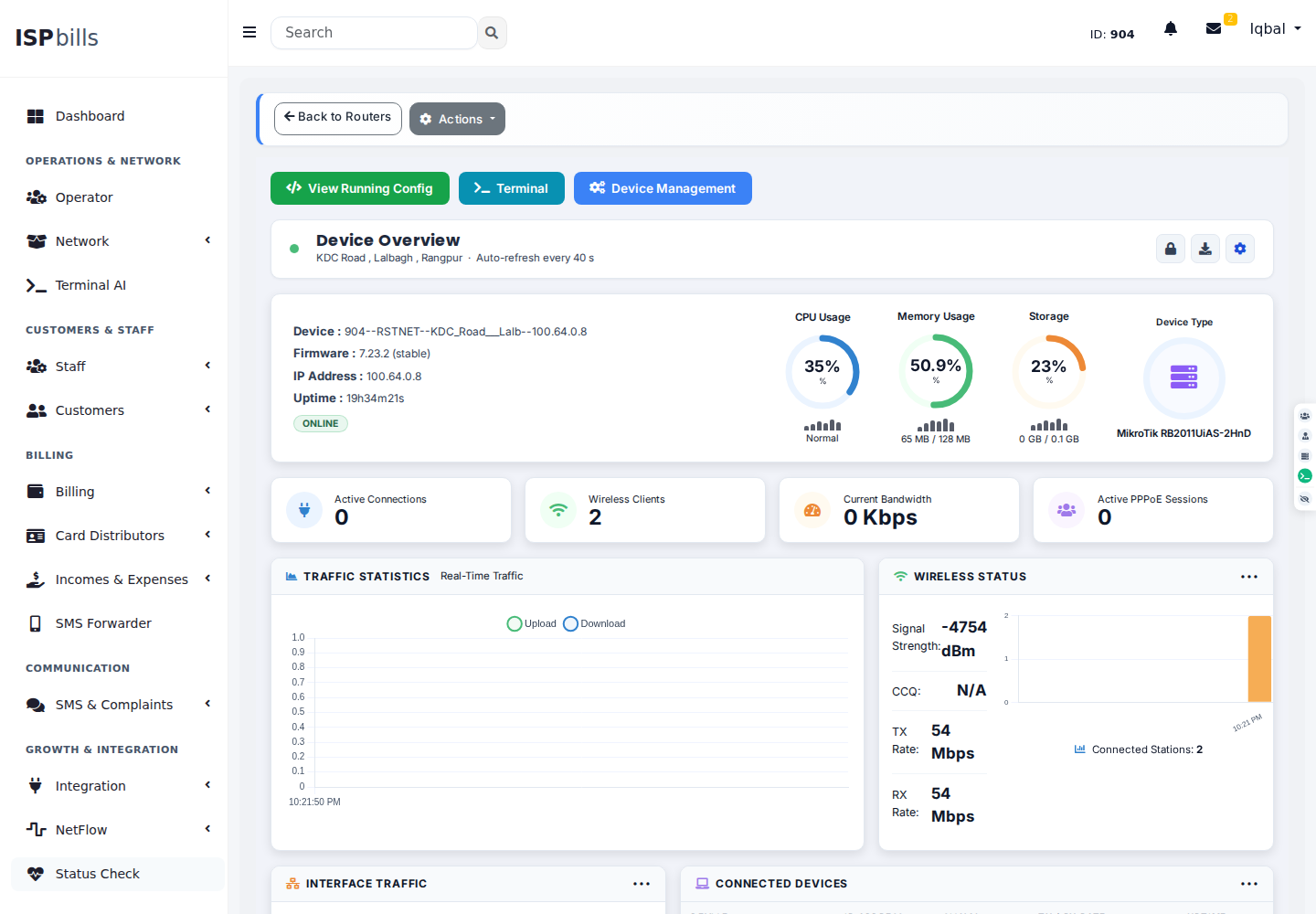
Choose API, RADIUS or a controlled hybrid based on the job.
RouterOS API operations are useful for configuration and direct device actions. RADIUS provides centralized authentication, authorization and accounting. ISPbills makes the distinction visible so teams can design a deliberate access architecture instead of treating every MikroTik integration as equivalent.
Connect the router
Register the RouterOS endpoint, verify credentials and use a private management path where the router is behind NAT.
Select the access model
Use direct PPPoE or Hotspot workflows, FreeRADIUS, or a tested combination appropriate to the service.
Map packages and policy
Relate speeds, profiles, pools, queues and expiry behavior to the subscriber package.
Monitor before changing
Review resources, interfaces, sessions and live bandwidth with subscriber and billing context nearby.
Everything this workflow needs—without losing the boundaries.
Capabilities shown here are implemented product areas. Device, provider and protocol behavior still depends on the selected integration and environment.
PPPoE billing
Coordinate PPP secrets or RADIUS-backed credentials, packages, recurring billing, expiry and reconnection.
Hotspot billing
Manage captive access, users, vouchers, plans, walled-garden context and supported payment journeys.
RADIUS accounting
Track authentication and session accounting centrally across supported NAS devices.
Bandwidth policy
Connect package speeds to profiles, queues and controlled RouterOS configuration workflows.
Router monitoring
Inspect health, interfaces, resources, wireless clients and traffic before support teams take action.
API automation
Use saved connections and auditable actions for supported RouterOS configuration rather than unmanaged scripts.
Use each MikroTik integration for the job it actually owns.
RouterOS API is a management path. RADIUS is an AAA control plane. ISPbills supports both, so operators can choose a direct, centralized or deliberately tested hybrid model.
Read implementation documentation →RouterOS API
Read device resources, interfaces, VLANs, wireless stations and active PPP or Hotspot context; perform supported device actions.
FreeRADIUS AAA
Centralize credentials, reply attributes, session accounting and compatible disconnect or CoA workflows.
Controlled hybrid
Keep configuration in the API path and subscriber authentication in RADIUS, with explicit ownership and rollback.
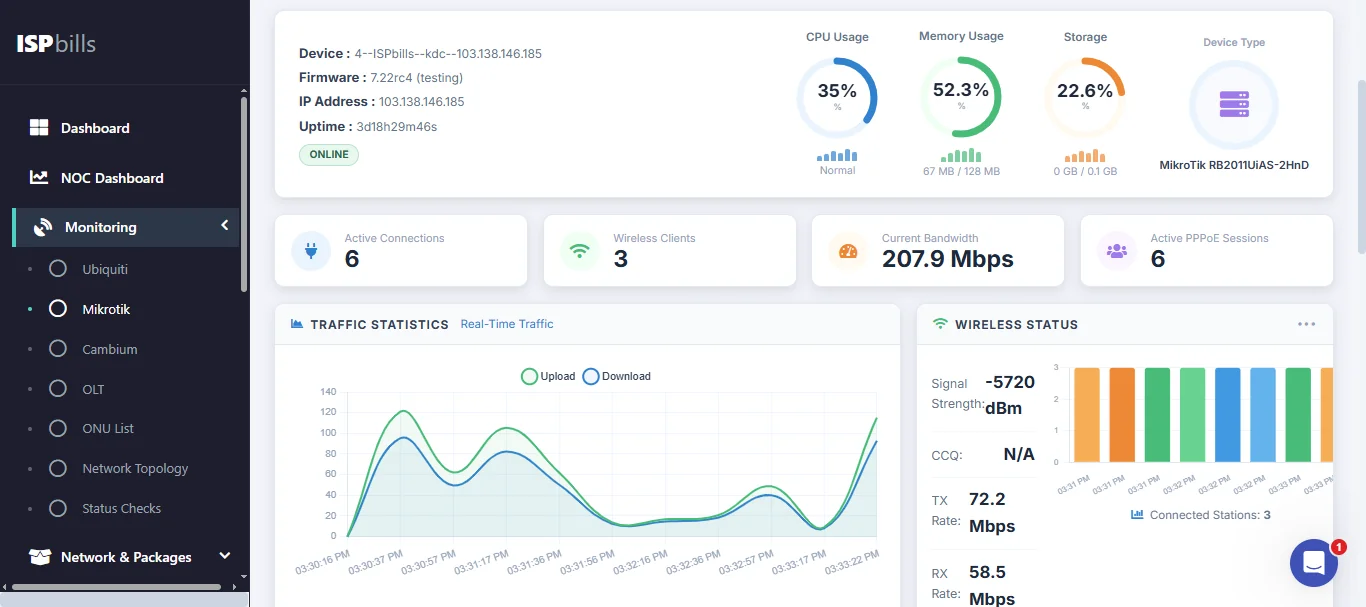
Inspect the router before a customer-impacting change.
The live monitor reads CPU, memory, storage, uptime, top interfaces, errors, drops, VLANs, wireless stations and active access counts when the RouterOS API exposes them.
Focused guides for the decisions behind the product.
Validate the network path before automating customer-impacting actions.
Public product information describes the current operating model. A controlled pilot proves the exact fit for your data, devices, providers and failure cases.
- 01ConnectivityConfirm routing, VPN, firewall, API port and credential scope from the ISPbills deployment to every managed router.
- 02Version compatibilityRecord RouterOS versions and test required read and write operations against representative devices.
- 03RollbackDefine who can approve service-affecting changes and how a failed package, queue or access update is reversed.
Straight answers before you deploy.
Need a model-, provider- or migration-specific answer? Bring the exact environment to the team.
Does ISPbills replace MikroTik User Manager?
ISPbills can provide the broader subscriber, billing, payment, support and network operating layer around MikroTik access. Test required User Manager attributes and migration data before replacing an existing deployment.
Does ISPbills use the RouterOS API or RADIUS?
It supports both operating models. API workflows manage supported device configuration and actions; FreeRADIUS centralizes authentication, authorization and accounting.
Can expired PPPoE users be suspended automatically?
Yes, when billing policy and the relevant RouterOS or RADIUS integration are configured. Test timing, grace rules and reconnection behavior before enabling production automation.
Can ISPbills monitor MikroTik routers?
Yes. Supported monitoring includes device resources, interfaces, connectivity, wireless context and live traffic views.
See how ISPbills fits the network you already run.
Explore the current product, then scope compatibility and migration with your actual devices, billing rules and integrations.