On this page
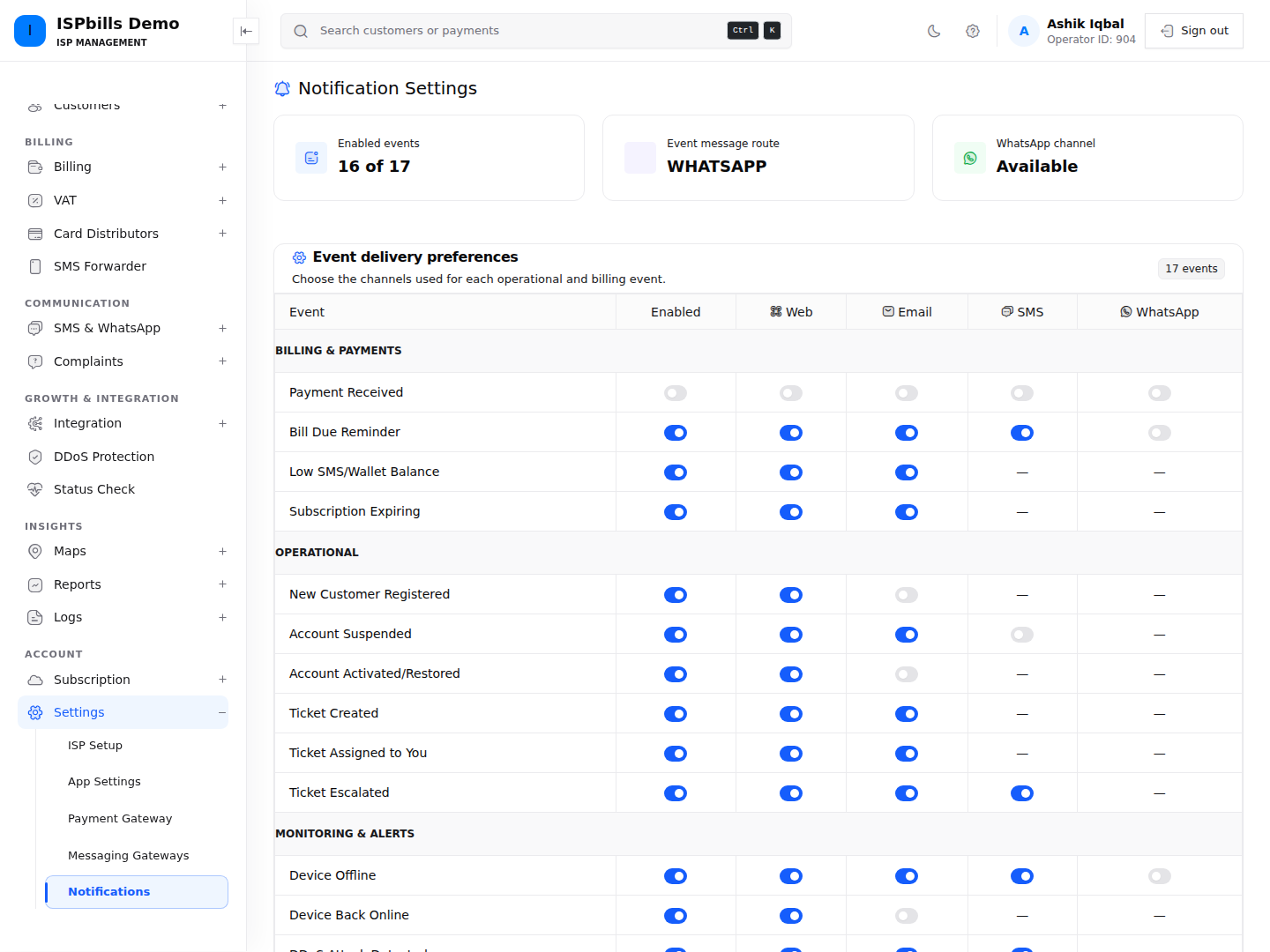
Settings → Notification Settings combines event preferences with Browser, Email, SMS, and WhatsApp channel setup.
Event preferences
Events are grouped under Billing & Payments, Operational, Monitoring & Alerts, and Audit & Security. For each event, enable or disable it and select only the channels offered in its row: Web, Email, SMS, or WhatsApp. A dash means that channel is not supported for that event.
Saving updates every event in the matrix; an unchecked event or channel is stored as disabled. Review the entire matrix before selecting Save Settings.
Configure channels
- Browser: grant the browser notification permission. The interface checks for unread notifications every 30 seconds; the Web column controls eligible events.
- Email: uses the configured Email Settings and links to branded previews.
- SMS: stores a vendor URL, API key, and API secret for this notification configuration.
- WhatsApp: appears when a gateway or WhatsApp access is available. Choose SMS or WhatsApp for customer event messages. For OTP delivery choose Auto (WhatsApp, then SMS fallback), WhatsApp only, or SMS only.
An enabled preference does not guarantee delivery. Test the channel, verify the recipient data, and inspect its history or provider response when a message is missing.
Need help applying this guide?Browse related guidance or ask the support team for help.